API vs SDK: Choosing Your Integration Path
The CX Platform offers two ways to integrate: the REST API for direct HTTP access from any language, and the Java SDK (us.cxgp:cx-sdk-client) for a type-safe, builder-pattern client that handles the low-level details. Both provide access to the same platform capabilities — choose the path that fits your stack and workflow.
Comparison at a Glance
| Aspect | REST API | Java SDK |
|---|---|---|
| Language support | Any language with HTTP support | Java 8+ |
| Setup complexity | Configure any HTTP client | Add a single Maven/Gradle dependency |
| Type safety | Manual — parse JSON responses yourself | Automatic — strongly-typed request/response objects |
| Authentication | Manually set the CX-API-KEY header on each request |
Handled automatically by the client once configured |
| Error handling | Parse JSON error bodies and HTTP status codes | Catch CxSdkClientException with structured error details |
| Async support | Yes — use any async HTTP library | Synchronous only — wrap calls in your own executor for async |
| Learning curve | REST/HTTP knowledge | Java + SDK builder patterns |
| Dependencies | None (just HTTP) | Apache HttpClient 5.2, Jackson 2.15.3, SLF4J |
Decision Flow (Visual)
Use this quick flow to pick the right integration path based on SDK availability for your language and your desired level of HTTP control:
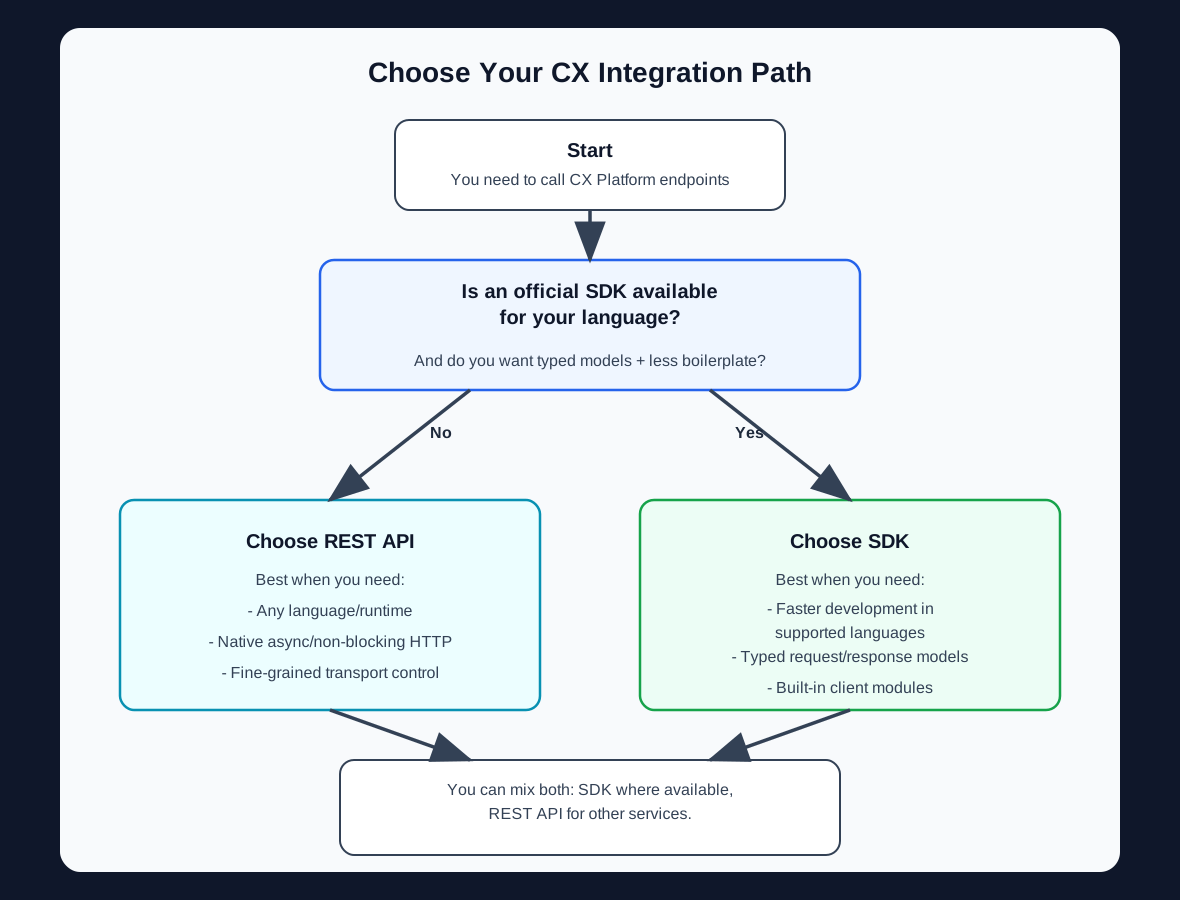
Quick decision rule
First, check whether an official SDK is available for your language. If yes and you want faster delivery with typed models, start with the SDK. If no, or if you need full HTTP-level control, start with the REST API.
When to Use the REST API
The REST API is the right choice when:
- You're not on the JVM — Your application is written in Python, Node.js, Go, .NET, or any other language.
- You need async/non-blocking I/O — You want to use reactive or async HTTP clients natively.
- You're building microservices — Lightweight services that make occasional API calls don't need an SDK dependency.
- You want a custom HTTP client — You have specific requirements for connection pooling, proxies, or interceptors.
- You're generating client code — You want to generate a client from the OpenAPI spec in your language of choice.
REST API — Create a Customer
This is a downstream location-scoped call. Set service location first using
POST /cx/v2/action/setServiceLocation with the same Location API key.
curl -X POST "https://cx2-main.pit.cxgp.us/cx/v2/action/setCustomer" \
  -H "CX-API-KEY: YOUR_LOCATION_API_KEY" \
  -H "Content-Type: application/json" \
  -d '{
    "givenName": "Ol",
    "familyName": "Persson",
    "primaryEmail": {
      "value": "ol.persson@example.com"
    }
  }'
When to Use the Java SDK
The Java SDK is the right choice when:
- You're a Java shop — Your backend services are Java or Kotlin and you want a native integration.
- You want faster development — Builder-pattern APIs and auto-serialization mean less boilerplate.
- Type safety matters — Compile-time checks catch errors before they reach production.
- You want less boilerplate — Authentication, serialization, and error parsing are handled for you.
- You have 15 API modules to integrate — The SDK mirrors every API resource as a dedicated module.
Java SDK — Create a Customer
This is a downstream location-scoped call. Run
client.getServiceLocationApi().setServiceLocation(...) first with the same
Location API key.
import com.gp.cx.sdk.api.CustomersApi;
import com.gp.cx.sdk.client.CxSdkClient;
import com.gp.cx.sdk.model.ChannelEmailDTO;
import com.gp.cx.sdk.model.CustomerDTO;

CxSdkClient client = new CxSdkClient.Builder()
    .apiKey("YOUR_LOCATION_API_KEY")
    .baseUrl("https://cx2-main.pit.cxgp.us")
    .build();

CustomersApi customersApi = client.getCustomersApi();

CustomerDTO customer = new CustomerDTO()
    .givenName("Ol")
    .familyName("Persson")
    .primaryEmail(new ChannelEmailDTO().value("ol.persson@example.com"));

CustomerDTO response = customersApi.setCustomer(customer);
Versioned REST paths
REST integrations should use explicit versioned paths such as /cx/v2/....
Java SDK clients should continue to use the environment host only in
baseUrl(...).
SDK-Only vs API-Only Considerations
Both approaches target the same CX Platform endpoints, but the integration experience differs in practical ways.
| Category | SDK-oriented advantage | API-oriented advantage |
|---|---|---|
| Client ergonomics | Typed models and builder-style request objects reduce manual JSON handling | Full control over request shape, headers, and transport behavior |
| Error handling surface | Catch CxSdkClientException and inspect structured details |
Handle raw HTTP status + response body in your own error pipeline |
| Runtime support | Native language specific integration | Any runtime with HTTP support (Python, Node.js, Go, .NET, etc.) |
| Async/non-blocking | Wrap synchronous SDK calls in your own executor/reactive layer | Use native async HTTP clients directly |
| Code generation | Prebuilt language specific client API modules (getCustomersApi(), etc.) |
Manual Rest Api coding in your preferred language |
Capability parity
Business capabilities are exposed through the REST API surface. The SDK is a convenience layer over that API for faster integration.
Performance Benchmarks (SDK vs Raw HTTP)
The SDK and raw HTTP both call the same CX endpoints, so network and server latency dominate in most workloads.
Benchmark context
Values below are illustrative planning baselines, not SLA commitments. Measure in your own environment (payload size, concurrency, region, retry policy, and JVM settings can shift results significantly).
| Scenario | Raw HTTP client (Java) | Java SDK | Typical takeaway |
|---|---|---|---|
| Cold start, first request | ~120-180 ms | ~125-190 ms | Nearly identical; SDK adds small client-side setup overhead |
| Steady-state p50 latency | ~55-75 ms | ~58-80 ms | Usually within single-digit milliseconds |
| Steady-state p95 latency | ~110-170 ms | ~115-180 ms | Tail latency mostly driven by network/service variability |
| Single-worker throughput | ~13-18 req/s | ~12-17 req/s | Similar throughput for typical CRUD-style calls |
| Developer effort | Higher (manual serialization/error plumbing) | Lower (typed APIs and shared client config) | SDK often wins on implementation speed |
How to choose with performance in mind
If you need extreme tuning for a narrow hot path, raw HTTP can offer more control. For most integrations, the SDK's productivity benefits outweigh the minor client-side overhead.
Side-by-Side Code Comparisons
The examples below show the same operation implemented both ways.
1) Get Service Location
curl -X GET "https://cx2-main.pit.cxgp.us/cx/v2/serviceLocation" \
  -H "CX-API-KEY: YOUR_LOCATION_API_KEY"
import com.gp.cx.sdk.api.ServiceLocationApi;
import com.gp.cx.sdk.client.CxSdkClient;
import com.gp.cx.sdk.model.ServiceLocationDetails;

CxSdkClient client = new CxSdkClient.Builder()
    .apiKey("YOUR_LOCATION_API_KEY")
    .baseUrl("https://cx2-main.pit.cxgp.us")
    .build();

ServiceLocationApi serviceLocationApi = client.getServiceLocationApi();
ServiceLocationDetails location = serviceLocationApi.getServiceLocation();
2) Retrieve a Customer by ID
curl -X GET "https://cx2-main.pit.cxgp.us/cx/v2/customer/customer-uuid-here" \
  -H "CX-API-KEY: YOUR_LOCATION_API_KEY"
import com.gp.cx.sdk.api.CustomersApi;
import com.gp.cx.sdk.client.CxSdkClient;
import com.gp.cx.sdk.model.CustomerDTO;

CxSdkClient client = new CxSdkClient.Builder()
    .apiKey("YOUR_LOCATION_API_KEY")
    .baseUrl("https://cx2-main.pit.cxgp.us")
    .build();

CustomersApi customersApi = client.getCustomersApi();
CustomerDTO customer = customersApi.getCustomerById("customer-uuid-here");
3) Create a Statement
curl -X POST "https://cx2-main.pit.cxgp.us/cx/v2/action/setStatement" \
  -H "CX-API-KEY: YOUR_LOCATION_API_KEY" \
  -H "Content-Type: application/json" \
  -d '{
    "currency": "USD",
    "totalAmount": 5000,
    "statementDateTime": "2026-06-25T12:00:00Z",
    "embedded": {
      "customer": {
        "id": "customer-uuid-here"
      }
    }
  }'
import com.gp.cx.sdk.api.StatementsApi;
import com.gp.cx.sdk.client.CxSdkClient;
import com.gp.cx.sdk.model.EmbeddedCustomer;
import com.gp.cx.sdk.model.IDWrapper;
import com.gp.cx.sdk.model.StatementDTO;
import java.math.BigDecimal;
import java.time.OffsetDateTime;

CxSdkClient client = new CxSdkClient.Builder()
    .apiKey("YOUR_LOCATION_API_KEY")
    .baseUrl("https://cx2-main.pit.cxgp.us")
    .build();

StatementDTO request = new StatementDTO()
    .currency(StatementDTO.CurrencyEnum.USD)
    .totalAmount(new BigDecimal("5000"))
    .statementDateTime(OffsetDateTime.parse("2026-06-25T12:00:00Z"))
    .embedded(new EmbeddedCustomer().customer(new IDWrapper().id("customer-uuid-here")));

StatementsApi statementsApi = client.getStatementsApi();
StatementDTO statement = statementsApi.setStatement(request);
4) Create a Payment Request
curl -X POST "https://cx2-main.pit.cxgp.us/cx/v2/action/createPaymentRequest" \
  -H "CX-API-KEY: YOUR_LOCATION_API_KEY" \
  -H "Content-Type: application/json" \
  -d '{
    "currency": "USD",
    "totalAmount": 7499,
    "paymentRequestDateTime": "2026-06-25T12:00:00Z",
    "description": "Invoice-12345",
    "embedded": {
      "customer": {
        "id": "customer-uuid-here"
      }
    }
  }'
import com.gp.cx.sdk.api.PaymentRequestsApi;
import com.gp.cx.sdk.client.CxSdkClient;
import com.gp.cx.sdk.model.EmbeddedCustomer;
import com.gp.cx.sdk.model.IDWrapper;
import com.gp.cx.sdk.model.PaymentRequestDTO;
import java.math.BigDecimal;
import java.time.OffsetDateTime;

CxSdkClient client = new CxSdkClient.Builder()
    .apiKey("YOUR_LOCATION_API_KEY")
    .baseUrl("https://cx2-main.pit.cxgp.us")
    .build();

PaymentRequestDTO request = new PaymentRequestDTO()
    .currency(PaymentRequestDTO.CurrencyEnum.USD)
    .totalAmount(new BigDecimal("7499"))
    .paymentRequestDateTime(OffsetDateTime.parse("2026-06-25T12:00:00Z"))
    .description("Invoice-12345")
    .embedded(new EmbeddedCustomer().customer(new IDWrapper().id("customer-uuid-here")));

PaymentRequestsApi paymentRequestsApi = client.getPaymentRequestsApi();
PaymentRequestDTO paymentRequest = paymentRequestsApi.createPaymentRequest(request);
Can I Use Both?
Yes. The Java SDK calls the same REST API under the hood. You can use the SDK for most operations and drop down to raw HTTP calls for edge cases, new endpoints not yet in the SDK, or non-Java components in your architecture.
The SDK and API share the same authentication (CX-API-KEY), the same base URL, and the same data model — so switching between them is straightforward.
Tip
If your team has both Java and non-Java services, use the SDK where you can and the REST API everywhere else. The Authentication & Environments page covers how to configure both.
Next Steps
- Authentication & Environments — Configure your API key and target environment
- API Versioning — Learn when to use
/cx/v2/in REST calls - SDK Quick Start — Get the Java SDK running in 5 minutes
- SDK Usage Examples — Explore additional Java SDK operations
- API Reference (Swagger UI) — Explore and test endpoints interactively